
How We Designed and Built the Ru'yat Al-Sahel Join Page
At Aurisy Studio we designed a single join page for the Ru'yat Al-Sahel initiative, and built it so every application lands straight in our inbox — no database, no dashboard.
Ru'yat Al-Sahel is a free community initiative from Qatif that brings together three groups: business owners who need help with branding and marketing; creatives — designers, photographers and marketers — looking for real projects; and experts who want to share workshops and knowledge. We needed a simple front door to screen applications before adding people to the WhatsApp community.
See the live page: ruyat-alsahel.netlify.app
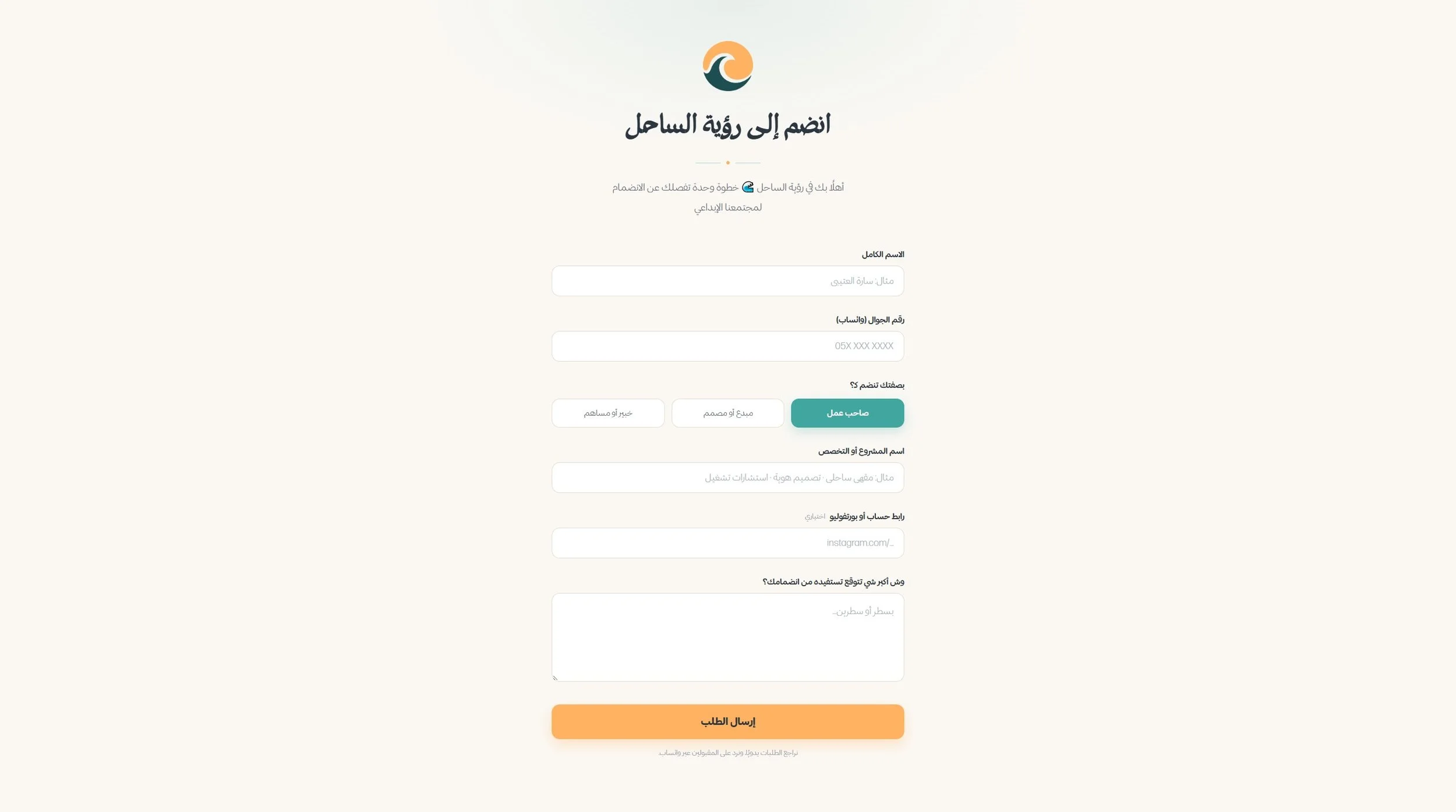
Design: the coastal identity on a single page
The page is a direct extension of the Ru'yat Al-Sahel visual identity: every element on it comes from the brand guide we designed for the initiative.
The logo at the top. The wave inside the sunrise circle is the first thing visitors see, so they know where they are before reading a word.
Colour. We chose a warm, light background that echoes coastal sand, and gave each brand colour a specific job:
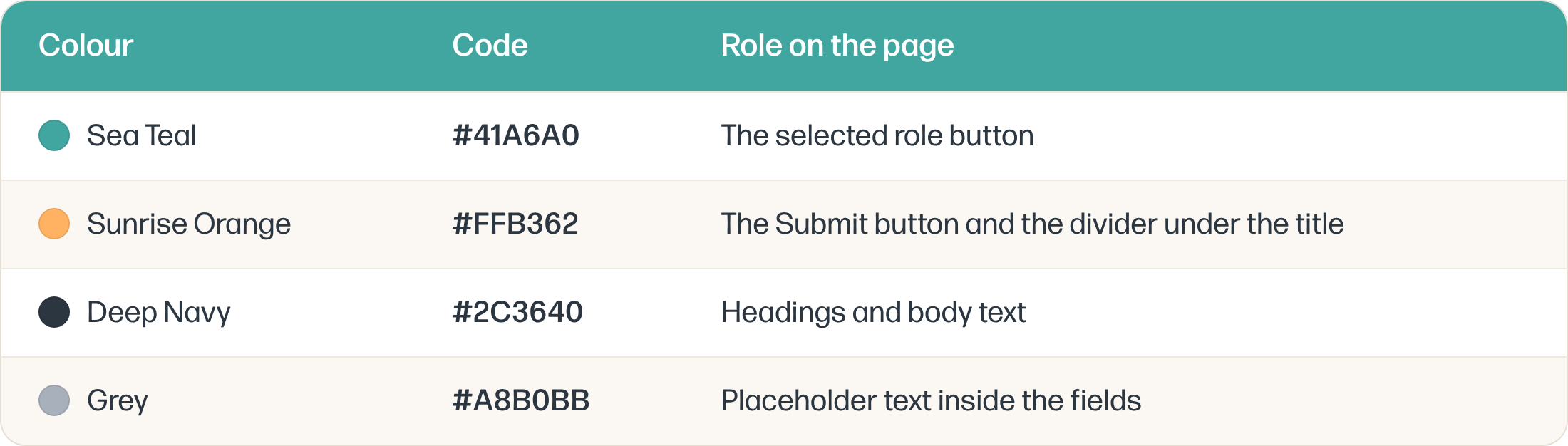
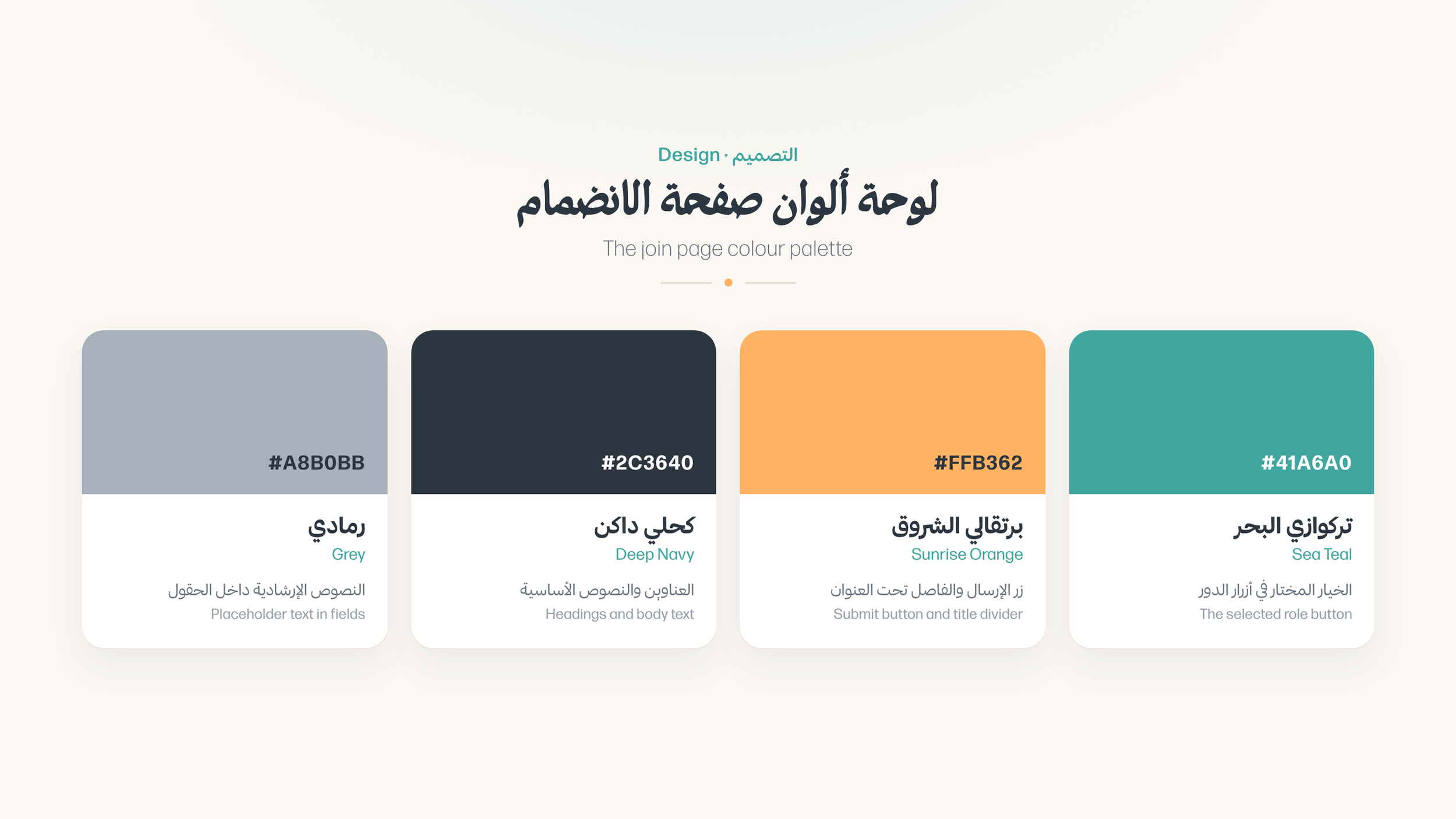
We made the Submit button orange because it is the warmest, most prominent colour in the identity, so the eye naturally comes to rest on it.
Type. The headline “Join Ru'yat Al-Sahel” is set in Mawj, the identity's primary typeface with its flowing letterforms. Fields and body text use the calm Forma, in light weights that are easy to read on a phone.
Tone. We wrote the copy in a warm local dialect rather than formal Arabic — lines like “just one step away from joining” and “what's the biggest thing you hope to get out of joining?”. We wanted visitors to feel they were talking to people from their own community, not filling in a government form.
Layout. A single centred column with generous spacing between fields; the same design works on phone and desktop without any changes.
User experience: just six fields
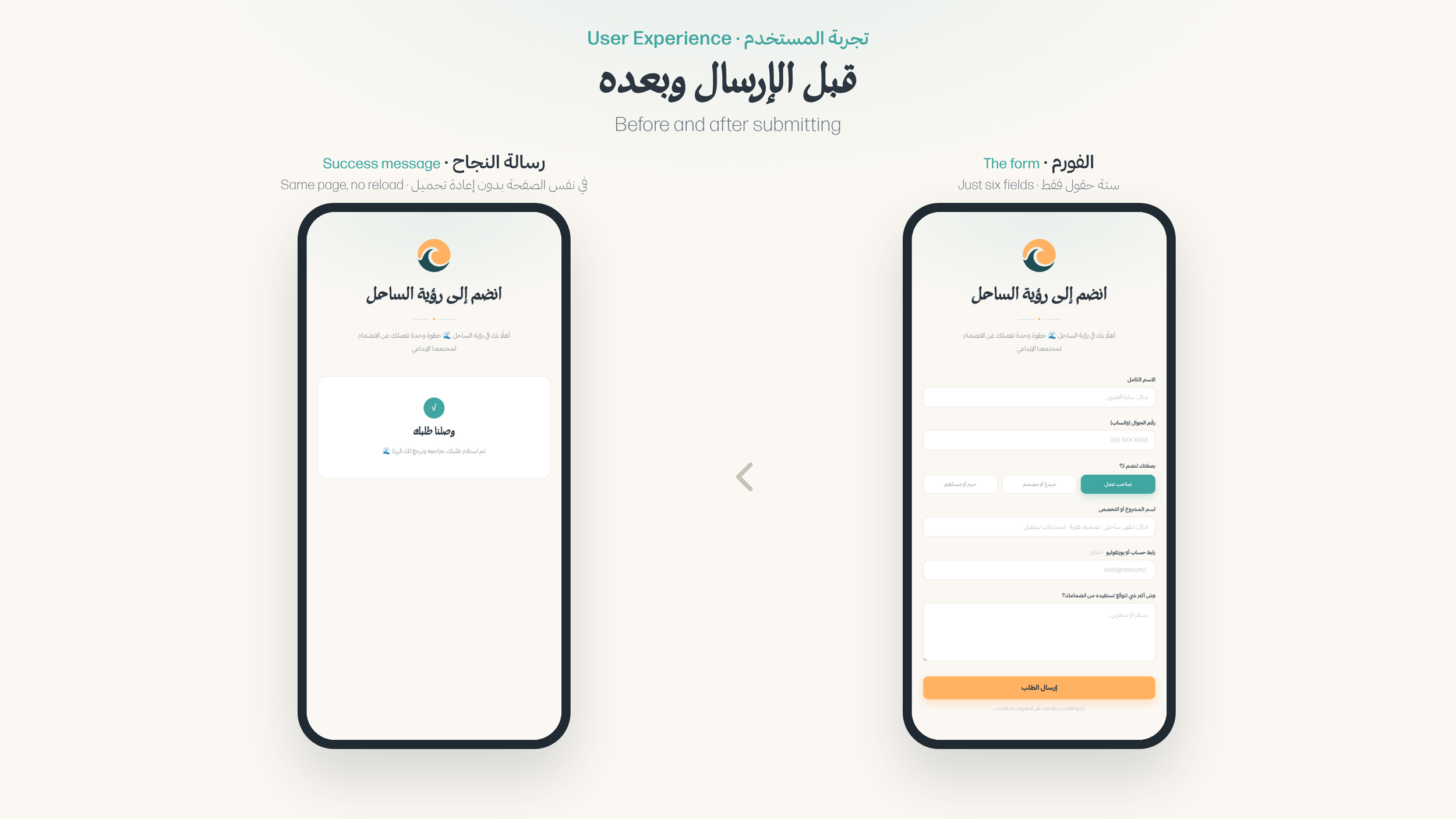
We cut the form down to six fields, each one something we genuinely need to decide on an application and get in touch.
Full name, with an example placeholder inside the field.
Mobile number (WhatsApp), in the 05X XXX XXXX format, because accepted applicants hear back on WhatsApp.
Joining as? Three buttons instead of a dropdown: Business owner, Creative or designer, Expert or contributor. Buttons show every option at a single tap, and the selected one turns teal.
Project name or specialty, with examples covering all three groups: a coastal café, identity design, operations consulting.
Account or portfolio link, clearly marked “optional” so people without one don't hesitate.
What's the biggest thing you hope to get out of joining? An open question that shows us how serious an applicant is; we asked for “a line or two” so it doesn't feel heavy.
Under the Submit button sits a small line explaining what happens next: “We review applications by hand and reply to accepted applicants on WhatsApp.” Applicants know what to expect and don't wait for an instant reply.
After submitting, the logo and headline stay in place, and the form is replaced by a white card with a teal check mark and the message “We've received your application — we'll review it and get back to you soon.” No redirect and no reload, so applicants can be sure it arrived.
Development: how an application reaches the inbox
The page is a single lightweight file with no server of its own, hosted on Netlify, and every application reaches our inbox within seconds through Formspree.
We chose this approach because the initiative is free in its early days, so we need no database, no dashboard and no running costs. The inbox itself becomes the record of applications, and we can review it from a phone at any time.
Formspree is simple: you sign up with your email and create a new form, and the service gives you a unique submission link (an endpoint). When the button is tapped, the page sends the data to that link as JSON, with the field names in Arabic (Full name, Mobile number, Joining as…), so each application turns into an email we can read straight away with no translating. It also filters spam and keeps an archive of submissions in the Formspree account as a backup.
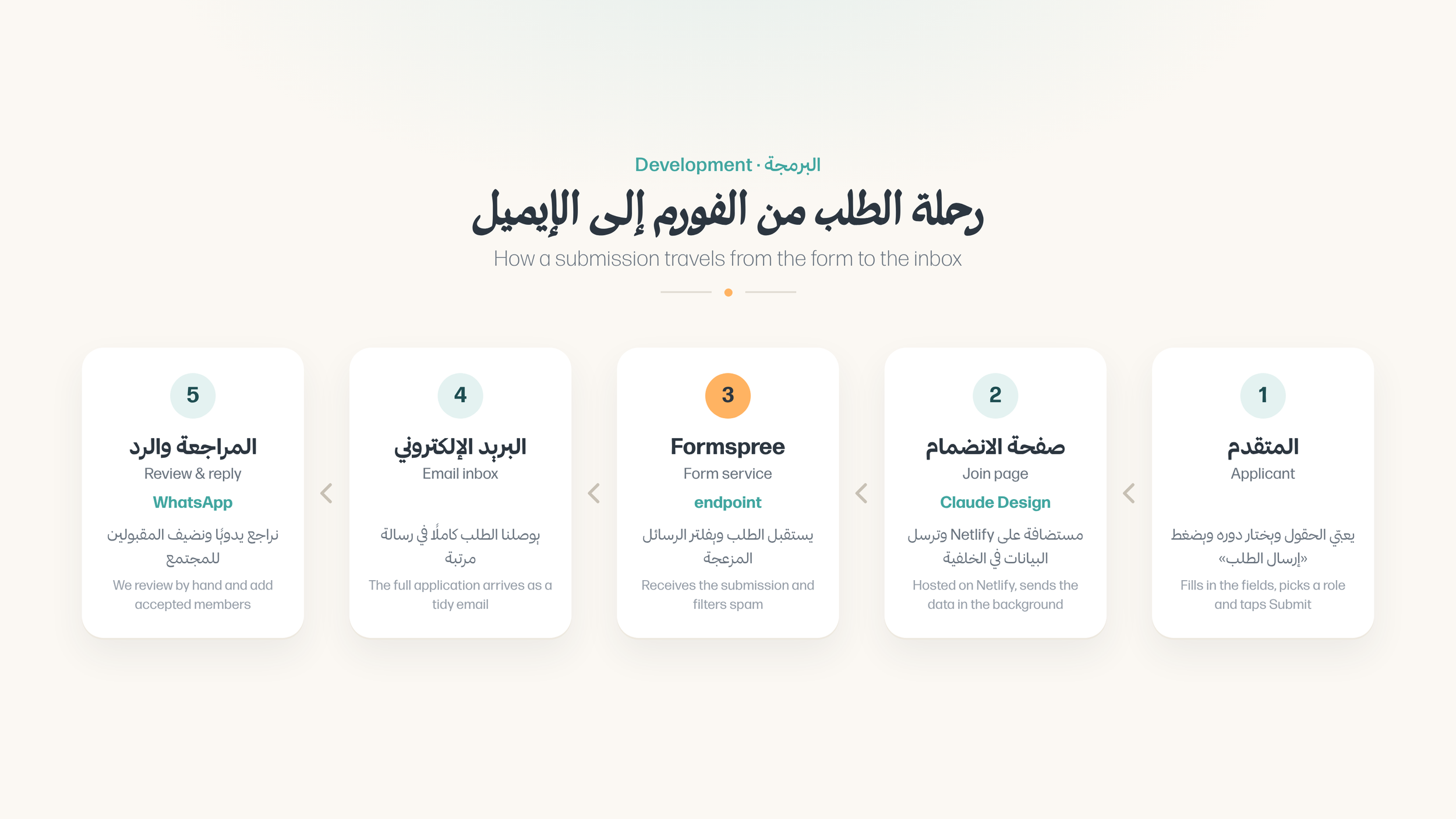
We designed and built the page in Claude Design, so the role buttons and the success message change in place without reloading. Here is an application's journey from the moment the button is tapped:
The applicant fills in the fields, picks a role and taps “Submit”.
The page checks that the required fields are filled in before sending.
The data is sent in the background to our form's Formspree link, without leaving the page.
Formspree turns the application into a tidy email in our inbox: name, mobile, role, specialty, link and answer.
As soon as it is sent, the form disappears and the “We've received your application” message appears.
We review each application by hand, contact accepted applicants on WhatsApp and add them to the Ru'yat Al-Sahel community.
The result is a page that loads fast on mobile, needs no maintenance, and delivers every application in full to one place.
Need a page like this?
This join page is an example of how we work at Aurisy Studio: start from the identity, simplify the experience, and choose the lightest technical solution that does the job.
If you have an initiative or project that needs a sign-up, booking or service-request page delivered to your inbox, get in touch on Instagram at @aurisystudio.sa and we'll design it in your project's identity.
